
You may be working from home due to the current COVID situation, below is some helpful tips to make sure your able to remote to your work PC.
Prerequisites
- Remote computer needs to be turned on and connected to the internet.
- You must have an RDP shortcut provided by CenCom.
RDP connection instructions.
Once you have told us you have been working from home one of our CenCom Technicians will have sent you a Remote Access Connection, it is laid out as following “yourpcname.rdp” this is what you will be using to remotely access your PC from home.
You will need to save the RDP connection to a safe place on your PC, we would highly suggest saving it to the desktop for ease of access.
The RDP connection works differently on how it connects on a PC and Mac and below are instructions on how to use it on both devices.
Windows Device
Simply save the RDP connection file onto your Desktop and double click onto the file which should display a Window like this:
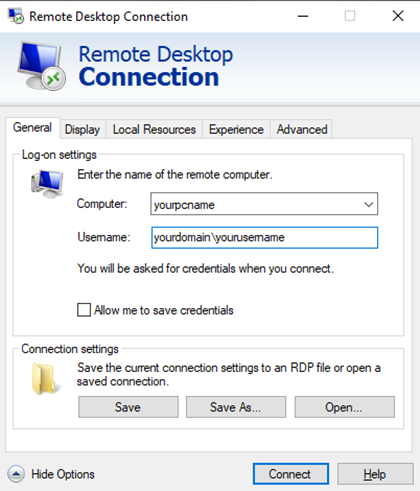
You will need to make sure that the “Computer” and “Username” boxes are automatically filled out with the correct information.
You will be prompted to enter your username and password you use to access your PC at work. The connection will open a new window showing your Work PC’s desktop and you have successfully connected.
NOTE: If you are asked to enter your PIN, this will not work. You should select the option to sign in as some else and choose “other account”.